For UK multi-academy trusts
Stop being your trust's
integration layer.
One platform for IT, HR, hiring, estates, safeguarding and governance — so your operation stops living in seven systems that don't talk to each other, and a real person stops being the glue between them.
Self-hosted on your infrastructure, or fully managed by us. Perpetual licence. Unlimited users — no per-seat tax.
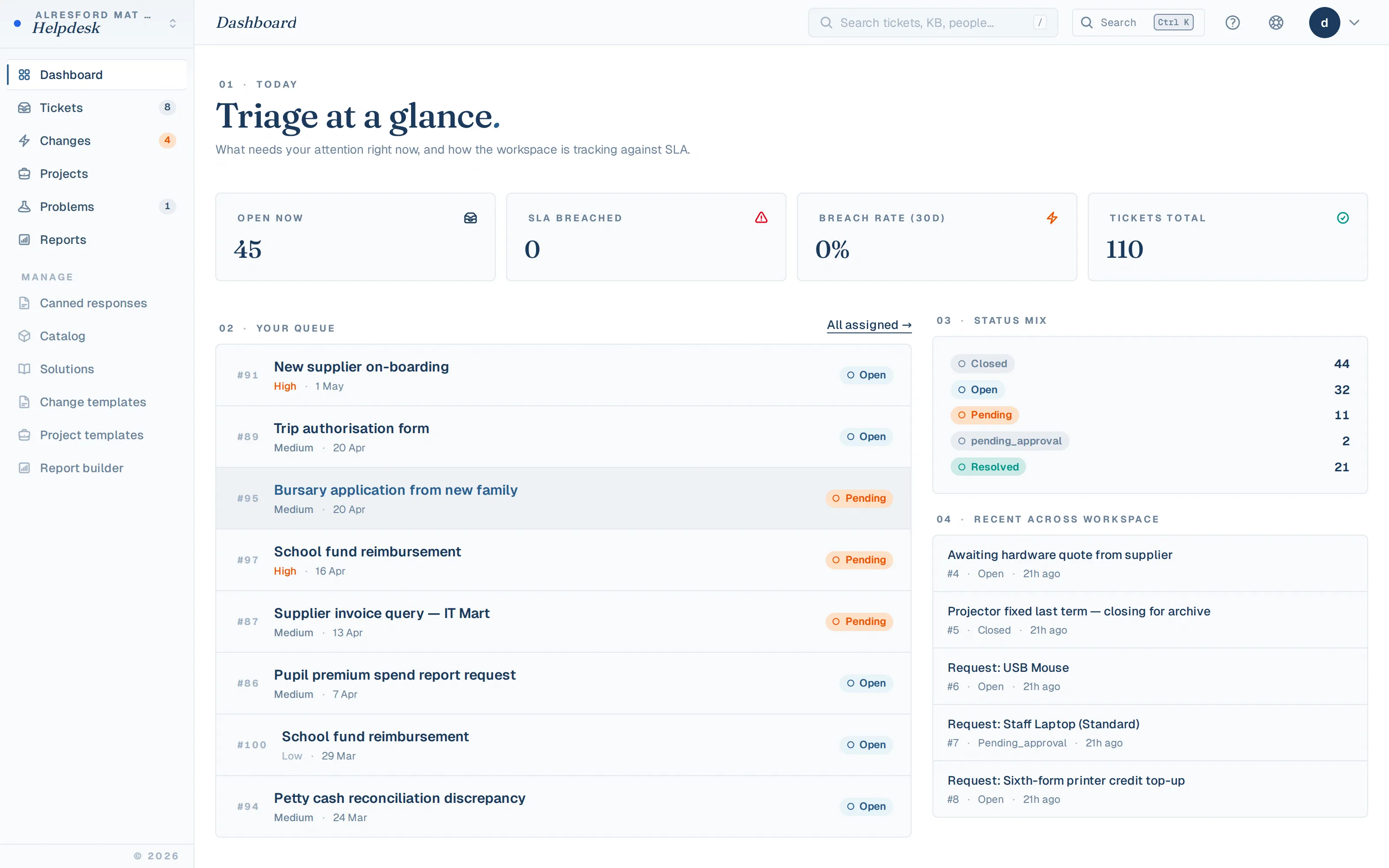
Live demo: staging.alresfordmat.uk — the real product running for our founding trust, with synthetic data. Or get a 7-day private instance, your branding, your structure.
Eleven products, four suites, one keystone — self-hosted or managed, the same arch.
Trusts switch when…
- You're prepping for Ofsted and the evidence is scattered across spreadsheets and six inboxes
- You're replacing FreshService and the per-agent invoice keeps climbing
- New starters take days to provision — and leavers keep their accounts too long
- You're centralising operations as the trust takes on another academy
- A statutory return — KCSIE, Cyber Essentials, the workforce census — needs a real audit trail
- None of these? You're probably better served by your existing tools — we'd rather say so than sell you another login.
The problem
The seven-tab trust, held together by one exhausted human.
A helpdesk here. An asset register there. Estates compliance in a third system, the SCR in a fourth, HR in a fifth, hiring in a sixth, a governance portal in a seventh. None of them talk to each other — so a real person becomes the integration layer, re-keying the same new starter into five tools and chasing evidence by email the week before inspection.
Every system you add is another login, another invoice that grows per seat, another export to reconcile. The tax isn't only the licence cost. It's paid in someone's time.
-
Helpdesk SaaS
login · invoice
-
Asset register
login · invoice
-
SCR spreadsheet
one typo from audit
-
HR system
login · invoice
-
Recruitment ATS
login · invoice
-
Visitor sign-in book
paper, in a fire
-
Provisioning scripts
one person knows how
-
Governance portal
login · invoice
…plus the spreadsheet that quietly ties them all together. Stones, without an arch.
One platform, not seven logins
Four suites and a keystone.
Eleven products, grouped by the team that owns them. Each stands alone — together they bear on one shared platform: one sign-in, one audit trail, one database. The person you hire is the same record the SCR checks and IT provisions, with no re-keying in between.
And the arch stands whichever pier holds it up — self-hosted on your infrastructure, or fully managed by us. Same software, same licence, your choice at any point.
IT Service & Identity — Head of IT
- Helpdesk + ITSM — Tickets, SLAs, change, problems, projects, major-incident war-room
- Assets + Network — Device register, licences, lifecycle, on-prem network discovery
- Identity Lifecycle New — Automated joiner-mover-leaver across Entra, Google & on-prem AD
People, HR & Recruitment — HR & Operations
- People + HR — Staff records, JML, leave, probation, casework, EDI, analytics
- Recruitment & Safer Hiring New — Vacancy to signed contract — with the KCSIE evidence built in
Compliance, Safeguarding & Estates — COO · DSL · DPO
- Single Central Record — Statutory checks, evidence, expiries, inspector-ready exports
- Health & Safety — Incidents + RIDDOR, risk assessments, accident book, COSHH
- Estates & Facilities — Statutory PPM, condition surveys, capital planning, contractors
- Presence — Welcome Desk New — Staff attendance, visitor sign-in & fire roll-call from one kiosk
Governance & Trust Leadership — Clerk · CEO · Trustees
- Governance & Compliance — Risks, policies, controls, scheme of delegation, trustee portal
- Leadership & Benchmarking New — Trust-wide assurance cockpit, league-table benchmarking, regional tiers
The platform — every suite shares it
- One audit & assurance fabric — Tamper-signed audit on every change; one-click signed inspection bundle across modules
- Native e-signature — Offers, contracts and policy acks signed in-platform — document bytes never leave your install
- Data migration toolkit — Guided import from FreshService, Civica, ServiceNow, Every, Wonde, GovernorHub & CSV — dry-run first
- Comms & broadcast hub — Trust-wide announcements and major-incident broadcasts with read receipts
- No-code automation — Build trust rules — when this happens, do that — across every module
- Native mobile app — iOS & Android: self-service, approvals, presence check-in, field capture, push
- AI, off by default — Triage, copilot and assist — PII-redacted, bring-your-own key, cost-capped
- Integrations — Entra ID, Google Workspace, on-prem AD, Wonde MIS, SCIM v2, REST API & webhooks
- GDPR & data ownership — DSAR bundle, ROPA, breach register; self-host and hold the source + database yourself
Parts list — Helpdesk + ITSM · Assets + Network · Identity Lifecycle · People + HR · Recruitment & Safer Hiring · Single Central Record · Health & Safety · Estates & Facilities · Presence — Welcome Desk · Governance & Compliance · Leadership & Benchmarking
Breadth, shown in time
Software that knows what September feels like.
Not a feature list — a year. Every module fires somewhere in the calendar your trust already lives by, from the starter surge to the August works window.
Starter surge — accounts provisioned before day one, inductions issued
Identity · People
Workforce census assembled from the live staff record, gaps flagged
People
DBS renewal sweep — reminders fire before anything lapses
SCR
Spring board pack exported; policies re-acknowledged
Governance
Exam-week change freezes — the helpdesk knows the timetable
Helpdesk
Leaver season — assets recalled, accounts retained to policy
Identity · Assets
Fire drills logged per school; roll-call from the kiosk
H&S · Presence
Recruitment season — vacancy to signed offer, checks on the SCR
Recruitment · SCR
Contractors inducted on site, DBS at the gate
Estates · Presence
Switching
Moving off your current tools is the easy part.
A guided migration toolkit imports your existing tickets, assets, people and records straight from FreshService, Civica, ServiceNow, Every, Wonde, GovernorHub or plain CSV. Every import runs as a dry-run preview first, and any rows that don't fit come back as a downloadable report you fix and re-run. You switch without a professional-services bill.
A weekend, not a quarter
- 1Point the importer at your export — we map the columns.
- 2Dry-run preview shows exactly what will land, and what won't.
- 3Import. Fix any flagged rows from the downloadable report.
- 4Re-run until clean. Your history comes with you.
AI, built in
AI that assists the work — off by default, private by design.
Every AI feature is off until you switch it on per workspace. Bring your own Azure / OpenAI key at provider cost — no markup — or use managed credentials. Free text is PII-redacted before any model call; executive context is aggregated counts only.
AI ticket triage
Classifies new tickets against your ticket types and departments and only fills blanks — it never overwrites a human's call.
Reply copilot
Surfaces the top KB articles and similar resolved tickets, with an optional AI-drafted first reply the agent edits and owns.
Ask AI
Staff self-serve answers from your published knowledge base in the help drawer — deflection before a ticket is ever raised.
Keystone Intelligent Assist
Natural-language Q&A for executives over an aggregated trust snapshot — "what risks if we take on another school?" — citing your own data.
Anomaly insights
A daily heuristic scan flags volume spikes, SLA-breach elevation and compliance overdues — deduped so persistent issues don't flood the dashboard.
Weekly headteacher briefing
A Friday digest per school — helpdesk, compliance and governance in a few paragraphs, with a recommended action.
Per-workspace monthly cost caps. Nothing leaves your install except the redacted prompt to the model provider you chose. How the privacy model works →
Why trust a new vendor
We're new. So we de-risk it structurally, not with logos.
KeystoneOps launched in 2026 — we won't pretend otherwise, and we won't show you a wall of customer logos we don't have. Instead, the things that usually make a new vendor risky are designed out: you can hold the source and the database yourself, so your operations don't depend on us still being here in five years.
It's built and run by a Head of IT inside a real UK multi-academy trust — the same problems, the same KCSIE deadlines, the same Ofsted week. Enterprise vendors price per agent and call your safeguarding lead a "ticket creator"; this is shaped around the school year and priced per trust. The story behind it → or compare it against your current stack →
Source code included
Licensed trusts get the source. It's built-in escrow: if we ever disappeared, you keep running, modifying and self-hosting it.
You hold the data
Self-host and your database never leaves your tenancy. Either way you get a full export plus the schema — no proprietary format, no exit fee.
Perpetual ownership
A one-time licence you own outright. Maintenance is optional and renewable on your terms — decline it at any boundary and the software keeps working.
Prove it before you commit
A 7-day private instance on your own structure, the live demo portal, transparent pricing, and an FAQ that answers the awkward questions.
Shown, not said
The numbers a procurement lead can check.
11
modules on one licence, one database, one sign-in
580+
backend tests on every release
86
scripted browser journeys through the real UI
152
help articles, in-app and public
£0
per seat, per agent, per user — forever
20%
optional maintenance; decline it and the software keeps working
Counts as of v1.3.2 — the same figures published on /engineering, refreshed each release. Every screenshot on this site is captured from the live demo by a script; none are mocked.
Candour as furniture
Stamped, either way.
Most vendor sites bury the limits. Ours are stamped — everything shipped carries a mark you can verify in the live demo, and everything we don't claim is stamped too, before the demo does it for us.
One-click inspection bundle
A signed evidence pack across SCR, estates, H&S and governance — assembled in minutes, not the week before Ofsted.
Tamper-evident audit on every change
HMAC-chained audit trail plus a separate immutable access log. Inspector Mode grants time-boxed, read-only access.
Native e-signature
Offers, contracts and policy acknowledgements signed in-platform — document bytes never leave your install. One more line-item deleted.
No live DBS checking
The SCR records the Update Service check a DSL runs by hand — with reminders and inspector-ready evidence. We don't pretend to query gov.uk for you.
Pupil sync ships switched off
Staff sync from your MIS works out of the box. Pupil data stays off until you've done the DPIA and opted in — deliberately.
Census is a draft assembler
It assembles the return from your HR data and flags every gap — today that's a CSV plus gap analysis, not yet a COLLECT-validated XML.
Who it's for
Different jobs, different lenses on the same platform.
COOs & operations · CEOs · CFOs · IT directors · HR directors · business managers · DPOs · DSLs · headteachers
See it running on your trust's data.
A 7-day private instance, fully populated with your academy structure, your branding, your departments. Sent to you by email with a written walkthrough — explore it at your own pace, no pressure, no slide deck.